Scan & Print – a Windows application for scanning and printing from other systems
For Onlinet, we built a Windows application that controls a Honeywell 4850DR document scanner and a Custom printer. Through its built-in WebAPI service, other applications send scan and print commands, and the user is guided step by step on screen.
- Client
- Onlinet
- Industry
- Document processing, hardware integration
- Period
- 2019
- Services
- Windows Forms application, WebAPI service, scanner and printer integration
- Technologies
- Windows Forms (.NET), Web API
- Integrations
- Honeywell 4850DR scanner (SDK), Custom printer
An application for Onlinet's clients
Onlinet delivers IT systems that need to scan and print documents on dedicated hardware. The application built by DevTeam is used by Onlinet's clients.
Those clients' names are confidential, which is why the logo in the screenshots is blurred.
Hardware without a common interface
The Honeywell 4850DR scanner and the Custom printer are controlled differently: the first through a dedicated SDK, the second through the Windows printing functions.
The goal was a stable application that takes scan and print commands from other systems through a standard interface and runs them on the hardware.
The DevTeam solution
We built a Windows Forms application that hosts a WebAPI service and talks directly to the scanner and the printer. These are the main components.
From command to scanned or printed document
The application sits between the software systems and the hardware: it receives the command and runs it on the scanner or the printer.
Another application sends a scan or print request to the WebAPI service.
The Windows Forms application that hosts the service passes the command to the right device.
The Honeywell 4850DR scanner captures the document and the Custom printer prints it.
Other applications scan and print documents without working with the hardware directly.
Scanner and printer controlled directly
The application uses the dedicated SDK of the Honeywell 4850DR scanner to capture and process scanned documents.
Printing on the Custom printer uses the print functions and native Windows libraries.
A WebAPI service for other applications
The Windows Forms application hosts a WebAPI service: a standard interface through which other applications and systems send scan and print commands.
Because everything goes through the API, the application connects easily to other software platforms.
Step-by-step guidance for the user
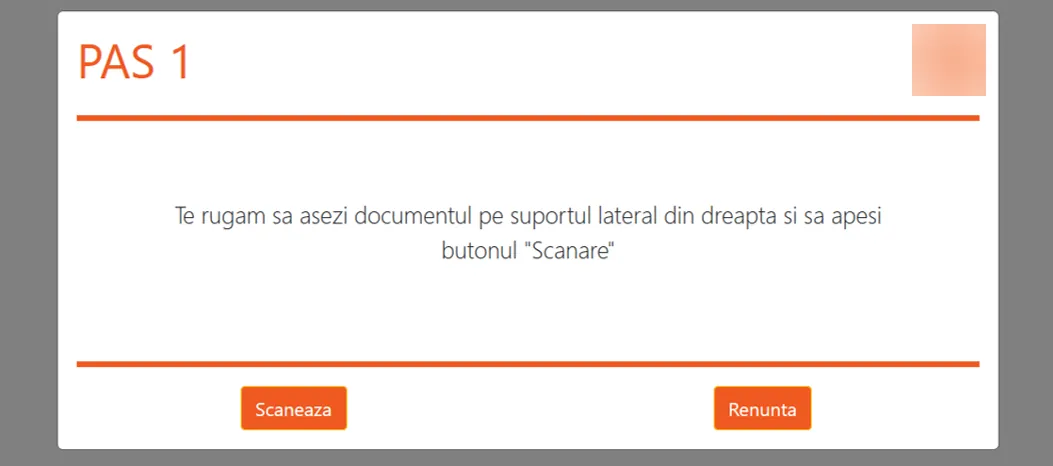
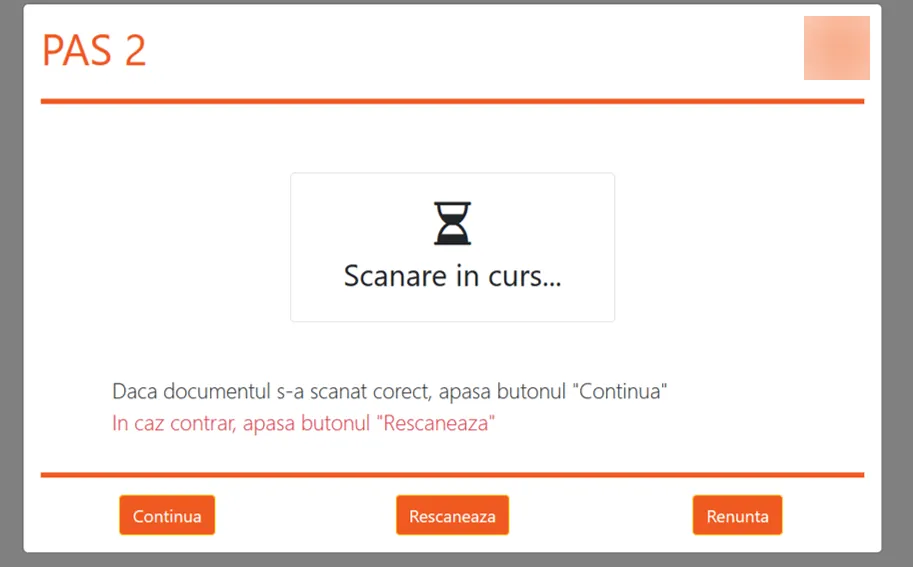
The interface guides the user: in step 1 they place the document on the side holder and press "Scan", in step 2 they see the scan in progress.
If the document was scanned correctly, they press "Continue". Otherwise they rescan it or cancel.
Key features
- Direct communication with the Custom printer
- Scanning through the Honeywell 4850DR SDK
- WebAPI service hosted in the Windows Forms application
- Scan and print commands sent from other systems
- Step-by-step guidance: scan, check, rescan
- Scanning and printing managed in one place
Results
- Other applications scan and print documents through an API, without code written for each device.
- The user sees on screen what to do at each step and can rescan a document.
- Scanning and printing are managed in one place, with fewer manual steps.
Technologies
- Windows Forms
- .NET
- Web API
- Honeywell 4850DR (SDK)
- Custom printer
Have hardware that needs to talk to your software?
We build applications that connect scanners, printers and other devices to your systems through a simple API. Learn more about web application development.